Conversational AI for customer service handles the questions that come back every day, so your team has time for the conversations that really need attention. Think of opening hours, lead times, the status of an appointment or how something works. The gain does not lie in an AI that takes over everything, but in a smart division of tasks between AI and people.
What conversational AI does in customer service
Conversational AI answers customer questions in everyday language, based on your own business’s information, through chat, WhatsApp or email. A customer types their question in their own words, the AI understands what they mean and answers straight away. If the question falls outside what the AI knows, a member of staff takes over.
That way conversational AI solves three familiar problems. Customers do not have to wait, not even in the evening or at the weekend. Your team is no longer swamped by repeat questions. And when it gets busy, for example after a campaign or an outage, the queue does not fill up. What conversational AI is exactly is explained in what is conversational AI.
Customer service is one of the places where AI delivers. Which other applications there are is covered in AI in business.
Which customer questions to automate and which not
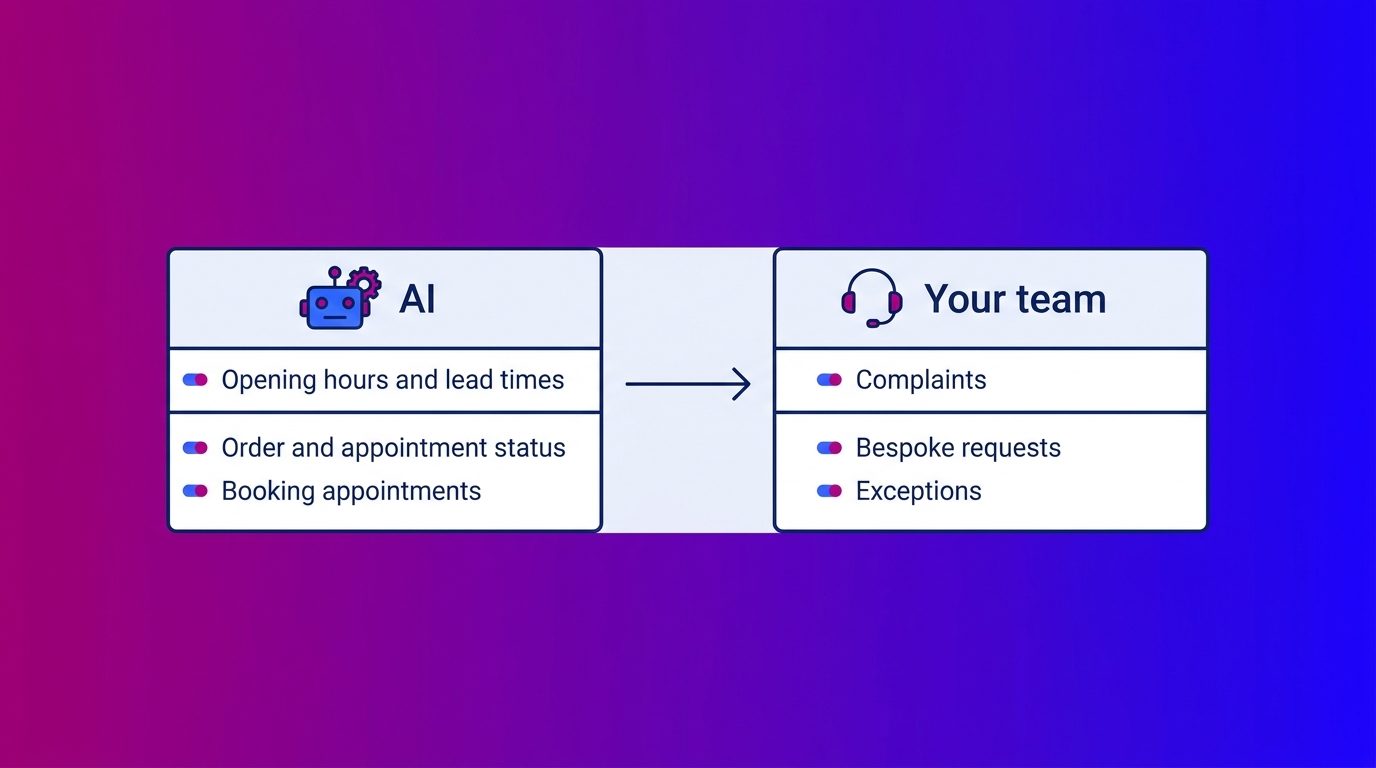
Automate the questions that are predictable and come back often, and leave everything that calls for empathy or bespoke work with your team. That rule of thumb prevents most problems.
- Automate: opening hours, lead times, the status of an order or appointment, booking appointments and explanations of products and terms.
- Keep with your team: complaints, bespoke requests, exceptions, emotional conversations and questions outside the knowledge base.
A handy test: does your team get this question at least a few times a week, and is the answer always the same? Then it is a good candidate for automation. Many of those questions come after the purchase, and that is exactly where you can handle recurring customer questions automatically without the customer noticing any difference in quality.
Automating customer service in four steps
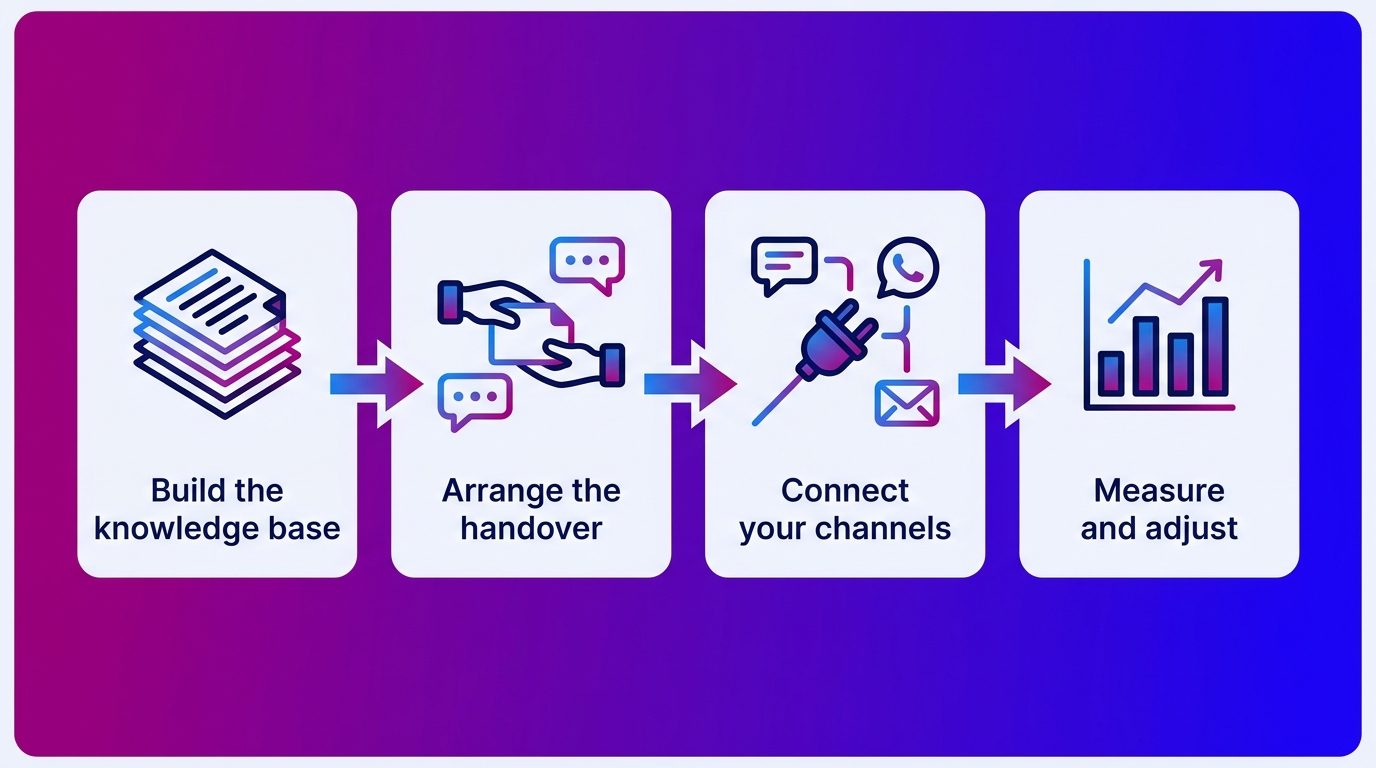
You automate customer service in four steps: build the knowledge base, arrange the handover, connect the channels and measure.
- Build the knowledge base. Collect the questions customers really ask, from your inbox, chat history and phone notes, and the answers your team gives. The AI is only as good as this foundation.
- Arrange the handover. Agree when a member of staff takes over: for a complaint, for a question outside the knowledge base or when the customer asks for it. Also arrange what happens outside office hours.
- Connect your channels. Customers ask their questions through the website, WhatsApp or email. Bring all those conversations together in one overview, so nobody has to ask a question twice.
- Measure and adjust. Look at which questions the AI handles well, where it gets stuck and how often it hands over. Which figures count for that is covered in chatbot metrics.
What such a project looks like from start to finish is covered in implementing conversational AI.
The handover to a member of staff: where it goes wrong
The handover to a member of staff is the weakest point of most automated customer services. An AI that keeps answering when it can no longer handle the conversation costs you customers.
You often see it go wrong in two ways: the chat window does not show that you can reach a person, and the customer only realises halfway through the conversation that they are talking to a virtual assistant.
The rules are clear too. If you serve customers in the EU, Article 50 of the EU AI Act requires that people know they are talking to AI, and good practice says there should always be an option for human contact alongside a chatbot. A good handover meets both:
- The AI states at the start that the customer is talking to AI.
- The customer can ask for a member of staff at any time.
- The AI announces the handover and passes on the whole conversation, so the customer does not have to ask their question again.
- Outside office hours the AI records the question and promises nothing the team cannot deliver.
The AI also processes personal data. Under UK GDPR you may not collect more data than you really need or keep it longer than necessary; the ICO’s guidance on AI and data protection explains how that applies to AI. So have the AI ask only for what it needs to handle the question.
How to set up that handover across your whole customer service, from the first question to your own team and across chat, WhatsApp and email, is covered in the article on AI customer service.
What we see in service questions
At Bconnect, AI and our chat specialists handle service questions for car dealers, kitchen showrooms, window companies and other businesses. Our chat specialists are available seven days a week from early morning until late in the evening, and the AI covers everything outside those hours.
What stands out: a service question is often a sales opportunity in disguise. Someone who asks a car dealer when their car can go in for a service sometimes asks about its part-exchange value in the same sentence. Someone who asks a window company about the lead time often also wants to know whether an extra window can be added. An AI that only answers the service question misses that opportunity. That is why we pass such signals straight to the client’s sales team.
After the purchase it is mainly about predictable work: booking appointments, answering status questions and sending reminders, such as for the MOT. That is where AI is at its strongest. Complex questions, complaints and exceptions go to the client’s own team with the full context. That way AI works where possible and a person helps where needed. How to improve your digital customer service with chat, AI and people starts with that division of tasks.
Smarter customer contact starts with the division of tasks
Conversational AI makes your customer service faster and easier to reach, as long as you use it as the first layer and not as the end point. Let the AI handle the predictable questions, arrange the handover to your team before you go live and measure where it goes wrong. You can read more about customer service in general in our customer service guide.
Frequently asked questions about conversational AI for customer service
What does conversational AI do in customer service?
Conversational AI answers customer questions in everyday language, based on your business’s information, through chat, WhatsApp or email. It handles the questions that come back often and hands complex or sensitive conversations over to a member of staff.
Which customer questions can AI handle?
Mainly predictable questions that come back often: opening hours, lead times, the status of an order or appointment, booking appointments and explanations of products and terms. Complaints, bespoke work and questions outside the knowledge base belong with your team.
Can AI replace my customer service team?
No. AI takes over the predictable work, so your team has time for complaints, exceptions and valuable conversations. Customers should also always be able to reach a member of staff.
How do you arrange the handover to a member of staff?
Agree in advance when a person takes over, for example for a complaint or a question outside the knowledge base. The AI announces the handover and passes on the whole conversation. Outside office hours the AI records the question, so the team picks it up the next day.
Do I have to tell customers they are talking to AI?
Yes. Customers should know they are talking to AI rather than a member of staff, and if you serve customers in the EU it is a legal requirement. A short notice at the start of the conversation is the simplest solution.
Is customer data safe with conversational AI?
That depends on the setup and the provider. Under UK GDPR you may not collect more data than necessary or keep it longer than needed. Choose a solution that is clear about where data is processed and uses it only for its intended purpose.
Does conversational AI also work through WhatsApp and email?
Yes. Conversational AI can answer questions through the chat on your website, through WhatsApp and through email. It works best when all those channels come together in one overview, so the customer does not have to ask again when switching channel.