WhatsApp customer service works well for short, recurring questions and for anything where a photo says more than an explanation. Customers message when it suits them, and the conversation stays on their phone. The flip side is that WhatsApp quickly becomes a second inbox nobody really manages. Below you will read which questions suit WhatsApp, how to set up customer service and what to leave to AI.
If you are still discovering what WhatsApp can do for business, start with our overview of WhatsApp Business.
Why customers choose customer service via WhatsApp
Customers choose customer service via WhatsApp because it fits how they already communicate: when it suits them, on their own phone, with a photo attached. They do not have to sit in a queue or fill in a form. According to Ofcom’s Online Nation 2025 report, 90% of UK online adults used WhatsApp in May 2025.
Three things make WhatsApp different from phone or email:
- The conversation carries on. A customer asks a question in the morning and reads the answer in their break. Nobody has to be online at the same time.
- Images are easy. A photo of a damaged part or a video of a leaking tap saves a lot of explaining.
- The history stays. With a follow-up question the customer, and you, can see what was agreed earlier.
Which service questions suit WhatsApp (and which do not)
WhatsApp is strong with questions that are short, recur often or need an image. For long case files and sensitive data another channel works better.
Suits WhatsApp well:
- Status questions: where is my order, is my car ready, when is the fitter coming?
- Making, moving or confirming appointments.
- Showing a problem with a photo, so your team knows what to bring.
- Short questions about opening hours, terms or how to use a product.
Suits WhatsApp less well:
- Complex complaints that touch several departments and need a case file.
- Sensitive data, such as identity documents or payment details.
- A technical judgement based on a photo. A photo helps to understand the question, but does not replace a professional who sees it with their own eyes.
How to set up WhatsApp customer service
Good WhatsApp customer service starts with agreements about who replies and when, not with the technology. Go through these steps:
- Choose between app and API. With one or two colleagues the WhatsApp Business app is enough. If you work with a team, several branches or a CRM, you need the API. Read in WhatsApp Business with multiple users where that limit lies.
- Prepare quick replies and labels. The app has pre-written answers for frequently asked questions and labels to sort conversations (WhatsApp Business). A label such as “waiting for part” prevents a question being left lying.
- Make your availability clear. A greeting and away message tell customers when they will get an answer. That way nobody expects a reply at 10pm that only comes the next morning.
- Prepare templates. After 24 hours of silence from the customer you may only send approved templates. Decide in advance which service messages you want to send, such as an appointment reminder or a notification that something is ready.
- Let WhatsApp come in where the rest comes in. If WhatsApp, email and the chat on your website sit in different apps, you miss questions. If you also have a button on your site, read how to combine WhatsApp on your website with your chat.
What AI handles and what goes to your team
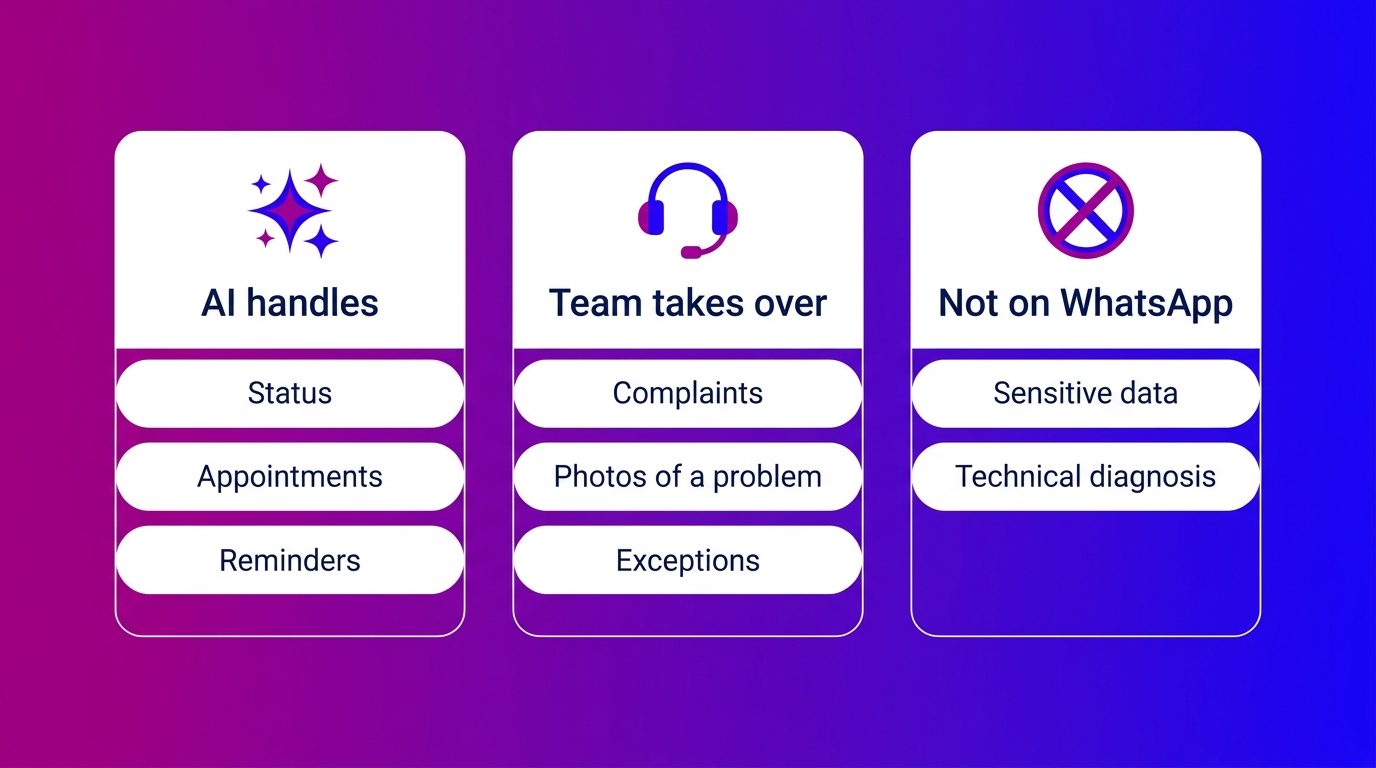
AI is strong in the questions that come back every day, your team in everything that deviates. The best WhatsApp customer service divides the work exactly like that.
An AI Service Agent answers frequently asked questions from your own knowledge base, books appointments and sends reminders, in the evening and at the weekend too. If it cannot get any further, or the customer asks for an agent, a person takes over. That is announced, and the colleague gets the whole conversation. More about that division of roles is in AI customer service.
If you would rather not set that up and staff it yourself, you choose a digital customer service that also answers WhatsApp, with AI for the routine and people for the rest.
Starting smaller, with an away message or a first bot? Then read how a WhatsApp chatbot works and what you should leave to your team.
What WhatsApp customer service costs
The WhatsApp Business app is free. If you use the WhatsApp Business API, you pay per delivered message, plus the software with which your team answers the conversations.
For customer service the difference between service messages and templates matters most:
- Service messages are your replies within 24 hours after a message from the customer. Meta charges these per message above a free monthly allowance per business number (Meta for Developers).
- Templates you send outside that window, for example a reminder or a status update. You pay for those per delivered message.
What the different kinds of message cost and how to estimate that in advance is covered in the WhatsApp Business API.
How WhatsApp customer service runs at car dealers and home and living businesses
In practice, WhatsApp customer service is mainly after-sales: the customer has already bought and wants something arranged. At Bconnect we see that in the two sectors we specialise in in the same way again and again.
- At car dealers it is about workshop appointments, whether the car is ready and reminders for the MOT. An AI Service Agent books the appointment and sends the reminder, and the workshop keeps time for the actual work. How dealers set that up is on our page about chat for the automotive sector.
- At home and living businesses, questions with a photo come in after the fitting of a kitchen, bathroom or window: a gap, a scratch, a door that does not close. That photo goes with the conversation to the service department, so the fitter knows what to bring.
One line we keep deliberately. If a customer sends a photo of a warning light on the dashboard, we do not make a diagnosis via WhatsApp. The conversation goes with the photo to the workshop, which can assess it.
WhatsApp customer service works when someone manages the channel
WhatsApp customer service is not an extra phone line, but a channel with its own rhythm: customers message when it suits them and attach a photo. Choose which questions you handle via WhatsApp, prepare quick replies and templates and make your availability clear. Let AI handle the recurring questions and your team the exceptions. And make sure WhatsApp comes in at the same place as your other channels, so no question falls through the cracks.
Frequently asked questions about WhatsApp customer service
How do you use WhatsApp for customer service?
Start with the WhatsApp Business app or, for a team, the WhatsApp Business API. Prepare quick replies, labels and an away message, decide which questions you handle via WhatsApp and let the conversations come into the same inbox as your other channels.
Is WhatsApp customer service free?
The WhatsApp Business app is free. With the API you pay per delivered message, above a free monthly allowance of service messages per business number. Templates outside the 24-hour window are always paid per message.
Can you automate WhatsApp customer service?
Yes. In the app you can use greeting and away messages and quick replies. With the API an AI Service Agent can answer frequently asked questions, book appointments and send reminders, and pass complex questions with the whole conversation to an agent.
How quickly should you reply on WhatsApp?
There is no fixed standard, but reply within 24 hours in any case: then the window stays open and you may reply freely. Use an away message to say when you are available, so nobody waits unnecessarily.
May you send customers a service update via WhatsApp?
Within 24 hours after the customer’s last message you may reply freely. After that you may only send pre-approved templates, such as an appointment reminder or a notification that an order is ready.
Can you combine WhatsApp and email in one customer service?
Yes, with an inbox that supports several channels. WhatsApp, email and the chat on your website then come in at one place, with the full history per customer. That works via the WhatsApp Business API, not with the stand-alone app.
What do you do with a complaint that comes in via WhatsApp?
Reply quickly and confirm that you have received the complaint. If the complaint is complex or sensitive data is needed, pass it with the whole conversation to the right colleague and agree via which channel you continue.