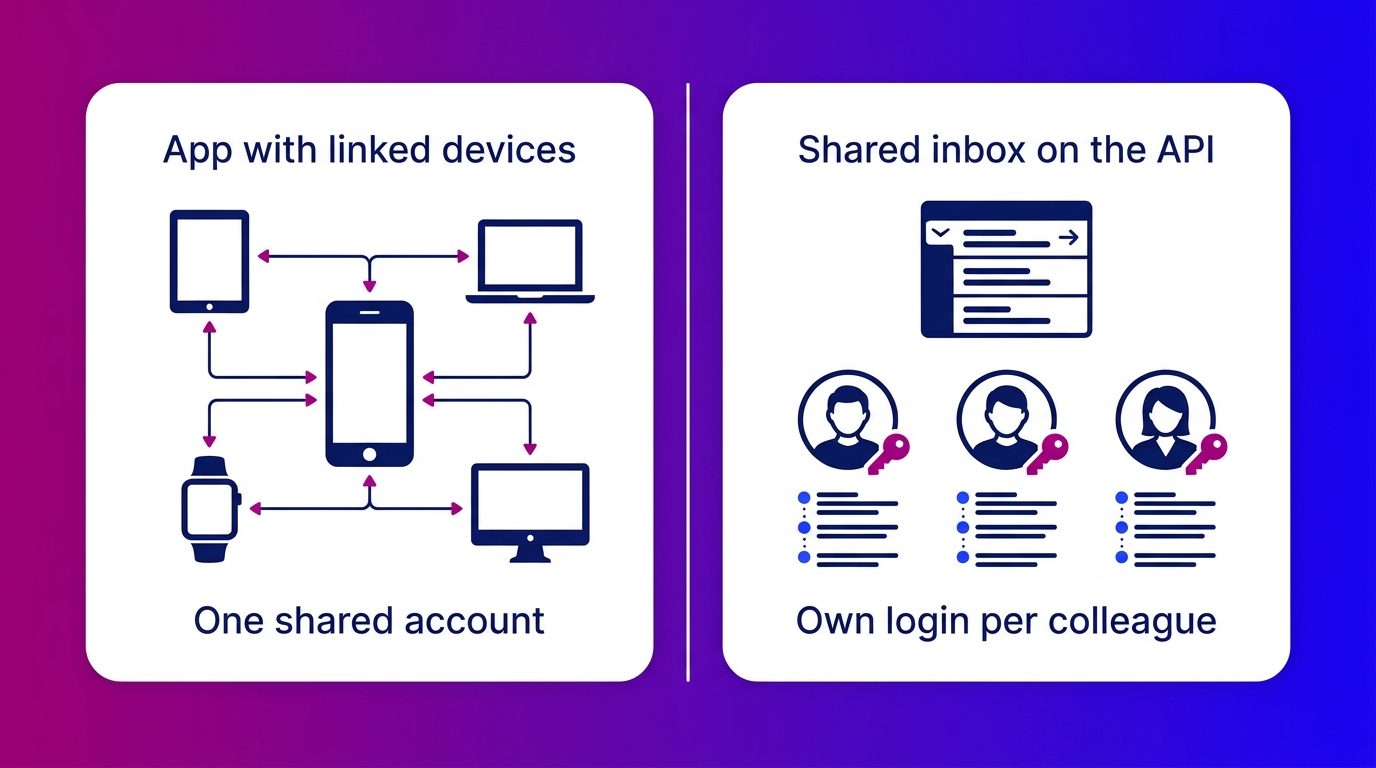
WhatsApp Business with multiple users is possible, but in the app all your colleagues share one account on a limited number of linked devices. For a small team that is enough. If you work with more people, several branches or with chat and email alongside WhatsApp, you run into the limits of the app. Below you will read what the app allows, how to link devices and when a shared inbox works better.
If you are still finding out what the app itself can do, start with our overview of WhatsApp Business.
Can you use WhatsApp Business with multiple users?
Yes: with the multi-agent feature you link up to four devices to one WhatsApp Business account, so colleagues answer customers from their own phone or computer (WhatsApp Help Center). Everyone then works in the same account, with the same number and the same conversations.
Within multi-agent you can assign conversations to a colleague and see internally which colleague sent a message. The customer does not see that: for them, your business simply replies.
With a paid Meta Verified subscription the limit goes up to ten devices. Meta notes that this extended version is not yet available to everyone.
WhatsApp Business on several phones: how to link devices
You link an extra phone or computer from the WhatsApp Business app on your primary phone. It works like this:
- Open WhatsApp Business on the primary phone, the device on which the number is registered.
- Go to Linked devices and choose Link a device.
- Scan the QR code on the new device with the primary phone, or link with the phone number.
- Repeat this per colleague, up to the maximum for your account.
Since April 2023 an account can also run on extra phones instead of only on WhatsApp Web or desktop. WhatsApp gave the example of staff answering customers from their own phone (WhatsApp Blog).
Note a few limitations. Tablets are not supported as a linked device and you cannot create or view broadcast lists on a linked device. If you do not use the primary phone for about two weeks, all linked devices are disconnected.
Where the app stops when you work as a team
The app is built for a business owner with a few colleagues, not for a team that distributes conversations all day. You notice that on four points.
- The account stays shared. There are no separate logins, roles or rights per employee. Anyone with a linked device sees all conversations.
- The number of seats is small. With four devices you have to choose who may look in. As soon as a fifth colleague joins, you disconnect someone else.
- Everything hangs on the primary phone. If it breaks, gets lost or goes on holiday, the whole team stands still.
- It stays WhatsApp only. Questions via your website chat, Messenger or email sit somewhere else, without a shared customer history and without an integration with your CRM.
Assigning in the app helps, but it does not solve the overview. When it is busy you still see two colleagues answering the same message, or a question left lying because everyone thinks someone else is picking it up.
If there is a WhatsApp button on your site, messages from website visitors come in too. How to put WhatsApp on your website and use it alongside your chat is covered in a separate article.
Multiple users via the WhatsApp Business API
A shared inbox gives every colleague their own login on the same WhatsApp number, without a limit on the number of devices. For that you connect the number to the WhatsApp Business API, Meta’s business integration that works with software instead of a phone.
In such an inbox a team works differently from the app:
- Conversations come into one list and are assigned to a colleague, a department or a branch.
- A colleague hands over a conversation with the full history, so the customer does not have to ask their question again.
- Per conversation you see who picks it up, what has already been said and what is still open.
- WhatsApp sits alongside your other channels, such as website chat, Messenger and email.
That is how you answer WhatsApp with your whole team from one inbox, with the same customer history as in your other channels.
The step to the API does not mean you lose the app. With coexistence you use the app and the Cloud API on the same number, and messages are mirrored between both (Meta for Developers). A few features, such as broadcast lists and group chats, drop away in that combination.
Which solution suits your team?
The right choice depends less on the number of colleagues than on how you distribute and follow up conversations.
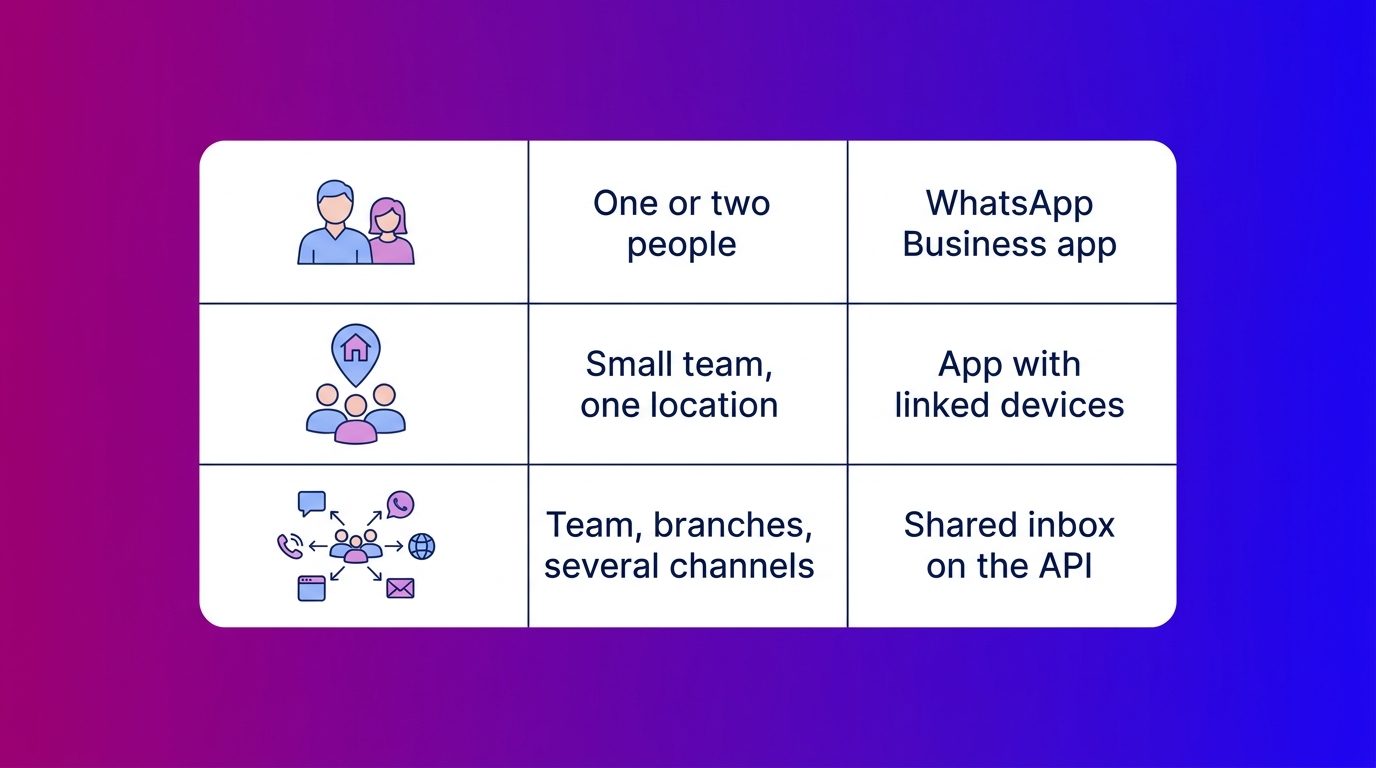
Torn between the second and third row? Then look at what happens when someone is ill or on holiday. If a colleague then has to look in someone else’s phone to help a customer, the app has become too small.
What we see when a whole team shares one WhatsApp number
A shared number usually only starts to chafe once WhatsApp becomes successful. At Bconnect we hold conversations via website chat, WhatsApp, Messenger, SMS and email, in one inbox as standard. That is why we see the same patterns again and again at businesses coming from a shared phone.
- The number hangs on one device. Often that is the showroom phone or the owner’s. In the evening and at the weekend it sits in a drawer, while that is exactly when customers message.
- Nobody knows who has already answered a question. At a dealer with several branches a test drive request comes in on one central number. Without assignment to a branch it is left lying, or two salespeople respond.
- The context gets lost in the handover. Whoever takes over a conversation scrolls back through a long chat or asks the customer everything again.
What helps is not linking more devices, but putting the conversation at the centre. With us a WhatsApp question comes into the same inbox as the website chat. A chat specialist or the AI picks it up and the lead goes with the full conversation to the right branch, in the CRM or by email. If a colleague of the client has to take over, that is announced and they get the whole history.
Multiple users on WhatsApp is mainly a matter of overview
The WhatsApp Business app works well for a small team sharing a few devices. You link colleagues in a few minutes and you can assign conversations. If the number of conversations, colleagues or branches grows, a shared inbox on the API is the logical next step. Every colleague then works with their own login, handovers carry context and WhatsApp sits alongside your other channels. The question is therefore not how many phones you link, but whether every conversation reaches the right person.
Frequently asked questions about WhatsApp Business with multiple users
How many devices can you link to WhatsApp Business?
In the WhatsApp Business app you link up to four devices to your account, in addition to the primary phone. With a paid Meta Verified subscription that can go up to ten, although that extension is not yet available everywhere.
Can WhatsApp Business run on two phones at the same time?
Yes. You link a second phone as a linked device from the app on your primary phone, via a QR code or your phone number. Both phones then use the same account and the same number.
Do customers see which colleague replies?
No. Customers do not see from which device or by which colleague a message was sent. Internally you can see in the app which colleague sent a message.
Does the primary phone have to stay switched on?
The primary phone does not have to be online continuously. If you do not use it for about two weeks, though, all linked devices are disconnected.
Does WhatsApp Business with multiple users cost money?
Linked devices in the app are free. For more than four devices you need a paid Meta Verified subscription. A shared inbox via the WhatsApp Business API costs money per message, plus the inbox software.
Can you manage several WhatsApp numbers in one inbox?
Not in the app: every number is a separate account. With a shared inbox on the WhatsApp Business API you can answer several numbers, for example per branch, in one environment.
Can you keep using the app if you switch to the API?
Yes. With coexistence you use the WhatsApp Business app and the API on the same number, and messages are mirrored between both. Some features, such as broadcast lists and group chats, then drop away.