The WhatsApp Business API is Meta’s business integration with which you send and receive WhatsApp conversations from your own software instead of from a phone. You need it as soon as WhatsApp has to do more than one employee with an app: working as a team, automating messages or connecting conversations to your CRM. Below you will read how the API works, what it costs and where businesses get stuck in practice.
What is the WhatsApp Business API?
The WhatsApp Business API, officially the WhatsApp Business Platform, is a set of APIs with which businesses connect WhatsApp to their own systems. At its heart is the Cloud API, which sends and receives messages from your business number, hosted by Meta itself (Meta for Developers).
The difference from the free app lies in who operates the conversations. The app is a program on a phone. The API has no screen of its own: you use it through software, such as an inbox for your team, a chatbot or an integration with your CRM.
You arrange access in two ways:
- Directly via Meta, if you have developers who build and maintain the integration yourself.
- Via a provider that has built the Cloud API into its software. That is the route most businesses without their own development team choose.
If you first want to know what the app itself can do, read our overview of WhatsApp Business.
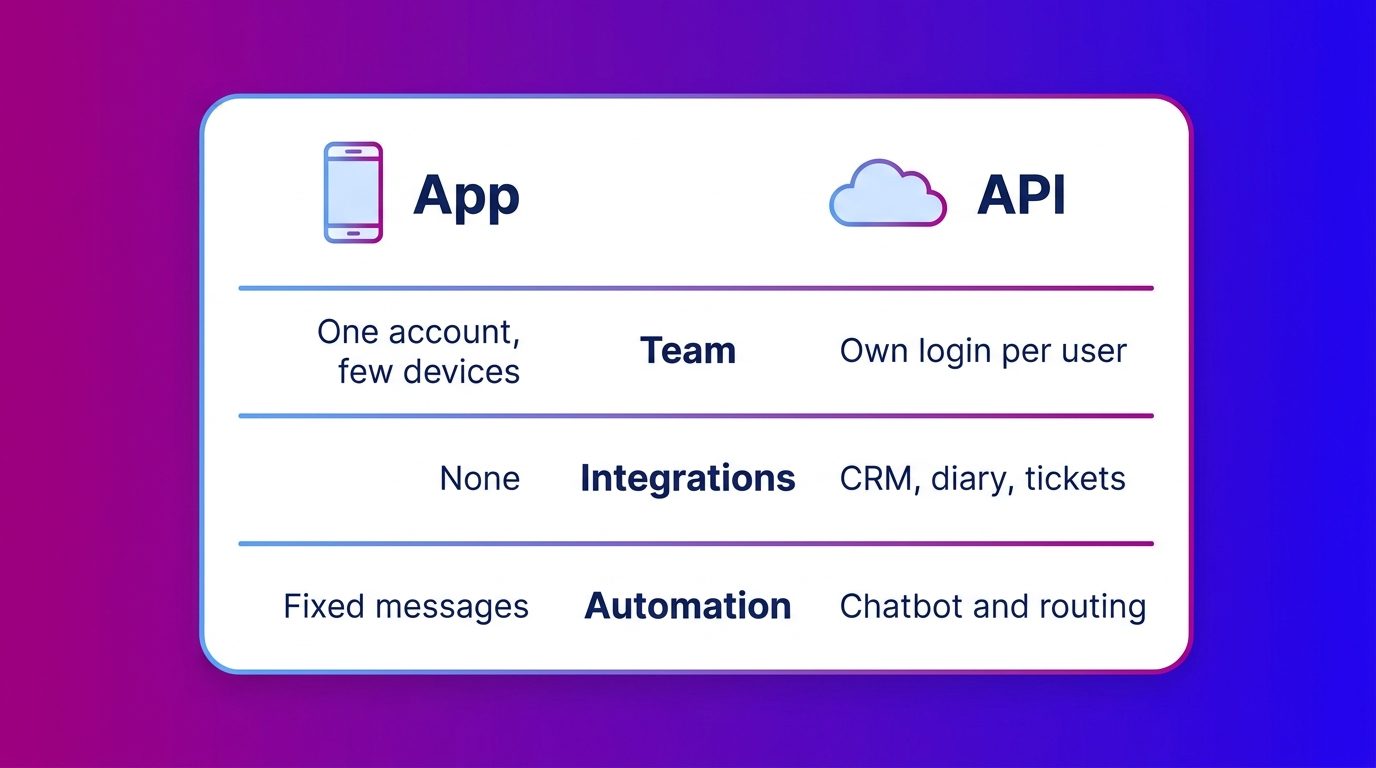
App or API: when do you need the WhatsApp Business API?
You need the API as soon as WhatsApp becomes part of a process instead of a separate phone. As long as one person answers the messages and little comes in, the free app is enough.
The app gets stuck on three points:
- Working together. The app runs on one phone with a limited number of linked devices. With several colleagues on one number it quickly becomes unclear who picks up which conversation.
- Automating. The app only knows simple automated messages. A chatbot, routing to the right department or follow-up via fixed messages requires the API.
- Integrating. With the app, conversations stay on the phone. Via the API every conversation can end up in your CRM, ticketing system or sales process.
A dealership with one salesperson who gets the occasional message gets by with the app. A dealer with sales, workshop and several branches on one number needs the API, if only to see who has already answered a test drive request.
Do you currently work with a few colleagues in the app? Then first read how WhatsApp Business with multiple users works and where the app’s limit lies.
What does the WhatsApp Business API cost?
The WhatsApp Business API costs money per message you send, plus the cost of the software you use it with. Connecting itself is free. Meta charges per delivered message from business to customer, and the rate depends on the type of message and the recipient’s country (Meta, WhatsApp Business Platform pricing).
Four kinds of message
The price depends on the kind of message:
- Marketing: offers, campaigns and reactivation. Always paid.
- Utility: order confirmations, appointment reminders and status updates.
- Authentication: one-time login codes.
- Service: ordinary replies within 24 hours after the customer messaged you. Per business number a monthly allowance of service messages is free; above that you pay per message.
Messages the customer sends to you are always free. An exception is conversations that start via an ad that clicks through to WhatsApp: then a free window of up to seven days opens. Anyone who answers many customer questions via WhatsApp should look at the monthly volume, because that now determines the bill.
How to activate the WhatsApp Business API
Activation comes down to having your business and number verified by Meta and preparing your messages. In broad terms:
- Verify your Meta business account with your company details.
- Connect the phone number you use for WhatsApp, with a display name customers see.
- Choose or build software with which your team answers the conversations.
- Create message templates and have them approved for everything you send outside the 24-hour window.
- Set up integrations with your CRM or other systems.
Templates and the 24-hour window
Outside 24 hours after a customer’s last message you may only send approved templates. Meta approves every template in advance and classifies it as marketing, utility or authentication (Meta, templates). A free-form follow-up question after two days is therefore not possible: you send a template and wait for the customer to reply.
App and API on the same number
You do not have to give up your existing number. With coexistence you use the app and the Cloud API at the same time on one number, and the message history stays the same between both. Some features do drop away, such as broadcast lists and disappearing messages (Meta, coexistence).
Connecting WhatsApp to your CRM and other systems
An integration makes sure a WhatsApp conversation does not stay stuck on a phone, but ends up where your team continues its work. Via the API the details from the conversation go to your CRM, ticketing system or diary, and an agent can see the customer history before replying.
What you connect in practice:
- New leads with name, question and the conversation record to the CRM or sales team.
- Service questions as a ticket in the support system.
- Appointments such as a test drive or a measuring appointment straight into the diary.
You can connect WhatsApp to your CRM via standard integrations, webhooks or custom work. An integration is useful but not a condition for starting: without one, leads can also come in by email. For customer questions that keep coming back, WhatsApp customer service is a logical next step.
If you want conversations via the API to be answered partly automatically, read how to set up a WhatsApp chatbot, with a handover to your team.
What we see when businesses move from the app to the API
The biggest change after the switch is not technical, but the moment you reply. With the app, WhatsApp is answered when someone has time. With the API every conversation comes into an inbox, and then it becomes visible how many questions are left lying in the evening and at the weekend.
At Bconnect, WhatsApp messages come into the same inbox as website chat, Messenger, SMS and email. Our chat specialists and AI answer them from 08:00 to 23:30, seven days a week, with AI outside those hours. A business then sees one customer history instead of separate channels, with a shared inbox for WhatsApp and your other channels.
Two things we often see go wrong in the switch:
- Follow-up after 24 hours. Teams send a free-form follow-up message and notice it does not arrive. So decide in advance which templates you need, for example for a quote reminder or an appointment confirmation.
- Leads stuck on the channel. A good conversation on WhatsApp only delivers once the details reach sales. We pass qualified leads with the full conversation record to the CRM, by email or into the client’s support system.
The WhatsApp Business API pays off once WhatsApp becomes a process
For one person with a few messages a day the free app is enough. As soon as you work as a team on one number, want to automate or want conversations in your CRM, the API is the next step. Budget for the cost per message and for paid service messages above the free monthly allowance. Decide templates and integrations in advance, and you prevent follow-up and leads disappearing between the channels.
Frequently asked questions about the WhatsApp Business API
Is the WhatsApp Business API free?
Connecting is free, but you pay per message you send. Meta charges per delivered message, depending on the type: marketing, utility, authentication or service. Per business number a monthly allowance of service messages is free. On top of that come the costs of the software with which you use the API.
What is the difference between the WhatsApp Business app and the API?
The app is a program on a phone for one person with few conversations. The API has no screen of its own and works through software, so a whole team can work on one number, automate messages and connect conversations to a CRM.
Can you use the app and the API at the same time on the same number?
Yes, with coexistence you use the WhatsApp Business app and the Cloud API on the same number. The message history stays the same. Some features, such as broadcast lists and disappearing messages, then drop away.
How long does it take to activate the WhatsApp Business API?
That depends mainly on the verification of your business by Meta and on how quickly your templates and integrations are ready. With complete company details and a clear picture of which messages you want to send, it goes faster.
What is the 24-hour window on WhatsApp?
The 24-hour window is the period of 24 hours after a customer’s last message. Within that window you may reply freely. After that you may only send approved message templates, until the customer replies again.
What are WhatsApp message templates?
Message templates are pre-written messages that Meta approves before you may send them. They are needed for every message outside the 24-hour window, for example an appointment reminder or an order update. Every template falls into the category marketing, utility or authentication.
Do you need a developer for the WhatsApp Business API?
Only if you build the integration directly with Meta yourself. Most businesses use the API through a provider’s software in which the integration is already built in. Then you mainly set up templates, users and integrations with your own systems.