What is live chat software? It is the technology behind the chat on your website: a window in which visitors ask questions and an inbox in which your team or AI answers. You will also see it called livechat software or chat software. If you first want to know what live chat is as a channel, start there.
Software is the tool, not the conversation. Which software is good depends on what needs to happen after the first question: who answers, where the lead goes and which channels are involved.
Two sides of live chat software
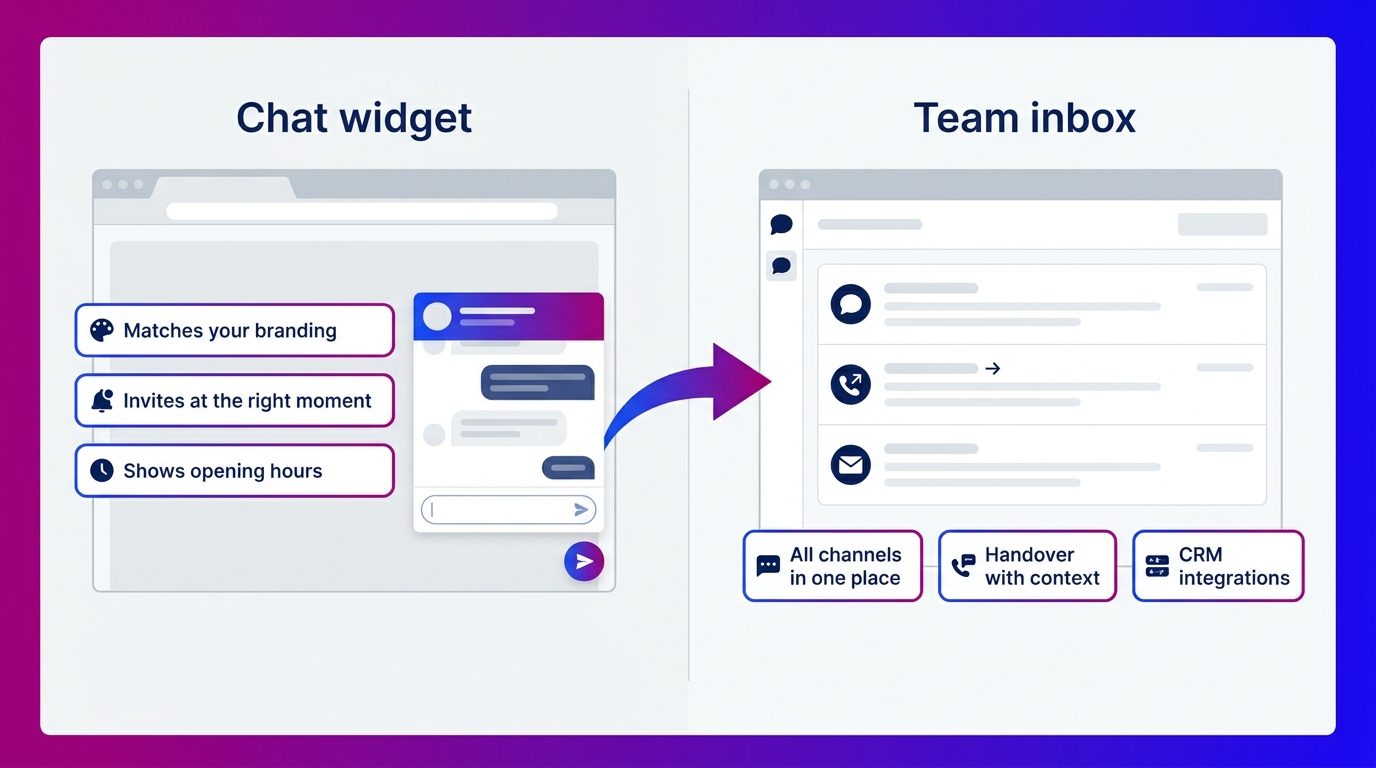
Live chat software consists of two parts: the widget the visitor sees and the inbox your team works in.
- The widget is the chat window on your website. The visitor types their question there and reads the answer.
- The inbox is the dashboard behind the scenes. All conversations arrive there, you see who is on your site and you answer the chats, yourself or with help from AI.
Both halves have to be right. A nice widget without a good inbox leads to missed chats. A strong inbox behind an inconspicuous widget leads to few conversations.
What is a chat widget?
A chat widget is the chat window that appears on your website through a small script, usually as a button in the bottom right. You decide what it looks like and when it appears.
A good widget does four things:
- It matches your branding, with your colours and a recognisable sender.
- It invites at the right moment, for example when someone stays on a model page or quote page for a long time.
- It shows when the chat is staffed. Nielsen Norman Group recommends showing the chat’s opening hours if it is not always open.
- It catches questions outside opening hours, with AI or a short form.
You add the script once, in your site’s code or through Google Tag Manager. How that works is covered in the article on adding live chat to your website.
The features you really need
The most important features of live chat software are about what happens to a conversation, not about what the widget looks like.
The basics
- One inbox for all channels. Website chat, WhatsApp, Messenger, SMS and email in one place. WhatsApp has its own rules: after the customer’s last message you have 24 hours to reply freely, after that only with approved templates.
- Handing over and finding back. Passing a conversation to a colleague, with the full history attached.
- Proactive messages per page. A different invitation on a product page than on your contact page.
- Integrations. Conversations and contact details go automatically to your CRM, calendar or helpdesk.
- Transcript. A copy of the conversation for the visitor and for your own records.
- Reporting. The number of conversations, the response time and how many conversations produce a lead.
Nice to have
- AI suggestions that propose an answer to your member of staff during the conversation.
- Routing by intent, so a buying question goes to sales and a complaint to service.
- Automatic summaries of every conversation in your CRM.
If you use AI that answers on its own, the visitor must know they are talking to AI. For customers in the EU that is required under Article 50 of the EU AI Act, and it is good practice everywhere.
Live chat app: chatting from your phone
A live chat app is your chat software’s inbox on your phone or tablet. Your staff use it to answer chats when they are not at their computer.
An app is handy for a small team that runs the chat alongside other work, such as an owner who keeps an eye on it in the evening. The downside is clear too: whoever answers the chat on their phone does so in between other things. Fully answering a question about a specific car or kitchen usually works better at a screen, with the website alongside.
You sometimes see “live chat app” used for apps in which consumers chat with each other. That is something different from business chat software on your website.
Software with or without staffing
Live chat software on its own means you answer the chats yourself. With a complete solution, the provider also supplies AI and people who answer.
Software without staffing suits you if your team has time and you mainly want the chat open during office hours. If you choose a website chat with AI and chat specialists, you get the software, the setup and the staffing in one. How to compare those options side by side is covered in the article on the best live chat software.
What software does not do for you
Software handles the window and the inbox, but not the conversation. At Bconnect we see that the difference lies in three things no software does by itself.
- Filling the knowledge base. The software knows nothing about your models, your bespoke work or your lead times. We gather that information together with the client and turn it into answers and scripts.
- Setting the right triggers. An invitation on the wrong page or at the wrong moment delivers little. Which pages and moments work, we tune per site and adjust after go-live.
- Asking follow-up questions. “Is this kitchen also available in another colour?” is an opportunity to ask about dimensions, budget and a showroom appointment. Our chat specialists do that, not the software.
Our chat specialists work in ChatRocket, our own platform. In it they find earlier chats, give feedback and update the answers. Leads go with the full transcript to the client’s CRM, inbox or support system, through our integrations.
Good software starts with what happens after the first question
Live chat software is the widget on your site and the inbox behind it. Choose on what matters: one inbox for all channels, handover with context, integrations with your systems and reporting. Also decide in advance who answers the chats, because that determines more than any feature. You will find more topics in the live chat knowledge centre.
Frequently asked questions about live chat software
What is the difference between live chat and live chat software?
Live chat is the channel: real-time contact through a chat window on a website. Live chat software is the technology that makes it possible, with a widget for the visitor and an inbox for the team that answers.
What is a chat widget?
A chat widget is the chat window on your website, usually a button in the bottom right. The visitor types their question in it. You add it with a small script and decide its appearance, position and when it shows an invitation.
Is there a live chat app?
Yes, a lot of chat software has an app your staff can use to answer chats on their phone or tablet. That is handy for small teams. For questions where you need the website alongside, a computer usually works better.
Does live chat software work with WhatsApp?
A lot of live chat software brings WhatsApp together with website chat, Messenger and email in one inbox. Note WhatsApp’s rules: within 24 hours of the customer’s last message you can reply freely, after that only with approved templates.
Do you need technical knowledge to install live chat software?
Usually not. You add one script to your website’s code or through Google Tag Manager. Setting up the answers, triggers and integrations takes more time than the installation.
Can live chat software answer automatically?
Yes, with AI live chat software can answer standard questions itself, day and night. Good software hands the conversation over to a member of staff if the AI does not know the answer. The visitor must know they are talking to AI.
Is live chat software GDPR compliant?
That depends on the provider. Check where the conversations are stored, put a data processing agreement in place and only ask visitors in the chat for the details you really need.