Chatbot training means giving your chatbot the right knowledge, clear boundaries and continuous improvement of its answers based on real conversations. You do not need to build a language model or write code for that. The work lies in the information you supply and in how often you look back at what the chatbot says.
Below you will read what chatbot training involves today, what you train with, how to approach it in six steps and how to measure whether it works.
What does chatbot training involve?
Chatbot training is filling and adjusting the knowledge, instructions and boundaries a chatbot uses to answer. With a modern AI chatbot you do not train the language model itself, but everything around it: which information it may use, how it should answer and when it brings in a person.
That work consists of three layers:
- Knowledge: the information the chatbot draws its answers from, such as product details, terms, delivery times and frequently asked questions.
- Instructions: the tone, the topics it does and does not talk about and what it must never promise, such as prices or discounts.
- Feedback: reviewing conversations, improving wrong or vague answers and adding missing information.
With a classic chatbot with fixed answers, training looks different. There you add questions and answers to a fixed library. How those two types of chatbot work is covered in how do chatbots work.
What do you train a chatbot with?
You train a chatbot with four sources: your own information, the questions customers really ask, conversations that have already taken place and agreements about when a person takes over. The more complete and current those sources, the better the answers.
- Your website and documents. Product pages, terms, price lists and manuals form the basis of your chatbot’s knowledge base. Make sure the information is correct before you supply it, because the chatbot repeats errors word for word.
- Example questions. Collect the questions your team answers every week, from your inbox, phone notes and contact forms. Note the variants too: “what does this cost?” and “is this within my budget?” call for the same answer.
- Conversation logs. If you already have live chat or WhatsApp, the real questions are in there, in your customers’ own words. That is the best training material there is.
- Handover rules. Record which questions make the chatbot bring in a member of staff: doubt, a complaint, a concrete buying question or a question with no ready answer.
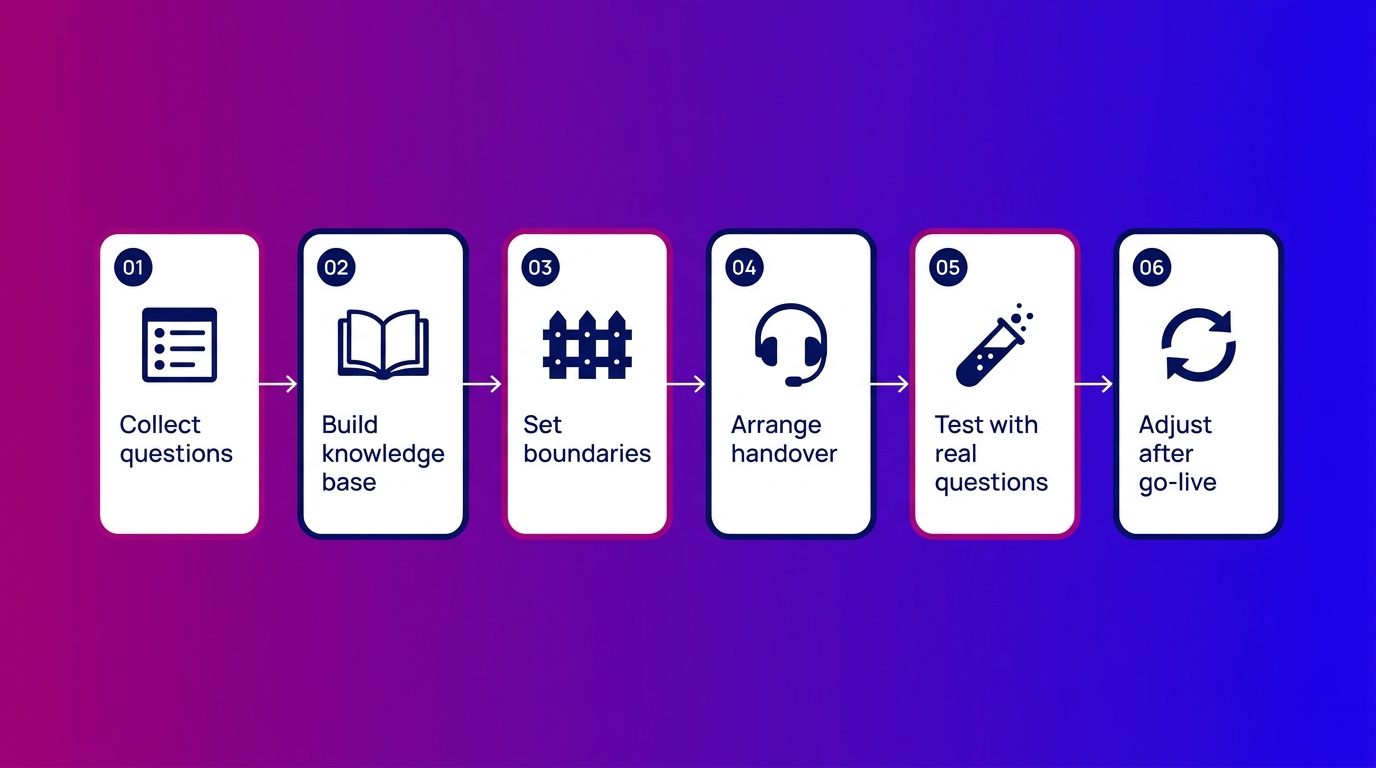
Training a chatbot in six steps
Training a chatbot starts with the questions customers ask and never ends: after go-live you keep adjusting. These six steps apply to a simple chatbot and to an AI chatbot.
- Collect the questions. Start with the twenty to thirty questions that come in most often. That is enough for a first version that can handle most conversations.
- Build the knowledge base. For every question, prepare the information that contains the answer. Short, separate pieces per topic are better than one long document.
- Set the boundaries. Write down what the chatbot does not talk about and what it does not promise. A chatbot that is allowed to negotiate on prices or make commitments will get it wrong sooner or later, as the chatbot examples of Air Canada and a US car dealer show.
- Arrange the handover. Decide when a member of staff takes over and make sure they see the whole conversation, so the customer does not have to repeat anything.
- Test with real questions. Have colleagues ask the chatbot questions the way customers do, with typos, half sentences and questions off topic. Not with the questions you had in mind yourself.
- Adjust after go-live. Read back every conversation in the first weeks. That is where you see which questions you did not foresee and where information is missing.
How do you train a chatbot without many conversations?
Without many conversations you train a chatbot with the questions you already know: from your inbox, your phone and your salespeople’s conversations. You do not need thousands of chats to start, but you do need a good picture of what customers want to know.
Three ways to get that picture:
- Ask your team. Staff on the phone or in the showroom know exactly which questions come back every day. Half an hour with them often delivers more than a month of chat logs.
- Look at your website. The pages visited most, and the searches in your site’s search bar, show what visitors are looking for.
- Start narrow. Let the chatbot do one task well first, such as questions about delivery times or booking an appointment, and expand once that task runs smoothly.
A small start has another advantage. With few topics, every conversation is easy to read back, so you quickly see where the chatbot gets stuck.
How do you measure whether the training works?
Whether the training works is visible in the answers the chatbot gives, not in the number of conversations. A chatbot that talks a lot but often refers people on or makes mistakes is not yet well trained.
These signals already tell you a lot:
- Handovers without reason. If the chatbot passes on conversations it could have handled itself, information is missing from the knowledge base.
- Repeated questions. If a visitor asks the same question twice, the first answer was not clear.
- Abandoned conversations. If a visitor drops out after an answer, check whether that answer was correct and whether it really answered the question.
- Errors. Every wrong answer is a signal that the source is out of date. In the Moffatt v. Air Canada case, a Canadian tribunal held the airline liable for a wrong answer given by its chatbot, as the American Bar Association describes: what your chatbot says, you say.
Adjusting is therefore a fixed task, not a job on the side. Where it goes wrong if nobody takes that role is covered in the disadvantages of chatbots.
How we train chatbots on real conversations
At Bconnect we see that most of the gain is not in the first set-up, but in the weeks after, when the real questions come in. That is why we do not train the chatbot once, but keep adjusting it.
We build the knowledge base together with the client. We collect the product information, terms and lead criteria and turn them into answers. Then our chat specialists read along with the conversations. If a specialist sees that the AI does not answer a question well, we add to the knowledge base or adjust the instructions, so the next visitor with the same question is helped properly.
An example from home and living: in the first weeks at a window and door company, questions come in about bespoke sizes and installation that were not in the information supplied. The AI announces a handover for those questions, a specialist takes over the conversation and the answer then goes into the knowledge base. That way the number of handovers per topic shrinks. If you would rather not do that work yourself, you can have the chatbot trained and managed by Bconnect. The trade-off between doing it yourself and outsourcing is in building a chatbot yourself or outsourcing it.
Training does not stop at go-live
Training a chatbot is not a one-off job but a fixed routine: supply good knowledge, set clear boundaries and keep reading back conversations. You do not need a large volume to start, but you do need a good picture of your customers’ questions and someone who makes time to adjust. Keep that up and after a few weeks you have a chatbot that answers most questions well and hands the rest over neatly to a person. All the articles on this topic are in the overview of chatbots.
Frequently asked questions about chatbot training
How long does it take to train a chatbot?
A first version with the main questions is often ready within a few weeks. Then the real training begins: in the first weeks after go-live you read back conversations and add to the knowledge base. That adjusting remains a fixed task afterwards.
Does a chatbot learn by itself?
No. A chatbot does not get better by itself by holding more conversations. Someone has to read back the conversations, correct wrong answers and add missing information. Only then does the chatbot give a better answer to the same question.
What is a knowledge base for a chatbot?
A knowledge base is the collection of information the chatbot draws its answers from, such as product details, terms, delivery times and frequently asked questions. The better and more current that knowledge base, the better the chatbot’s answers.
Can I train a chatbot with my website?
Yes, your website is a good basis for an AI chatbot’s knowledge base. First check that the information is correct and complete, though. Questions that are not answered anywhere on your site have to be supplied separately.
How often should you update a chatbot?
As soon as something changes in your offering, prices, delivery times or terms. Also read back conversations daily in the first weeks and at least weekly after that, so you spot new questions in time.
Who trains the chatbot if you outsource?
When you outsource, the specialist does the training and adjusting. You supply the information about your offering and pass on changes. Agree in advance how often conversations are read back and how you are kept informed of what has been improved.
What is the difference between training a chatbot and training an AI model?
Training an AI model is done by large tech companies with enormous amounts of data. Training a chatbot is about something else: the knowledge, instructions and boundaries an existing language model uses to answer questions about your business. You do not need technical knowledge of AI for that.